How to find jobs that fit your resume with InterviewChamp Jobs AI
Video · 1:33 · 3 chapters
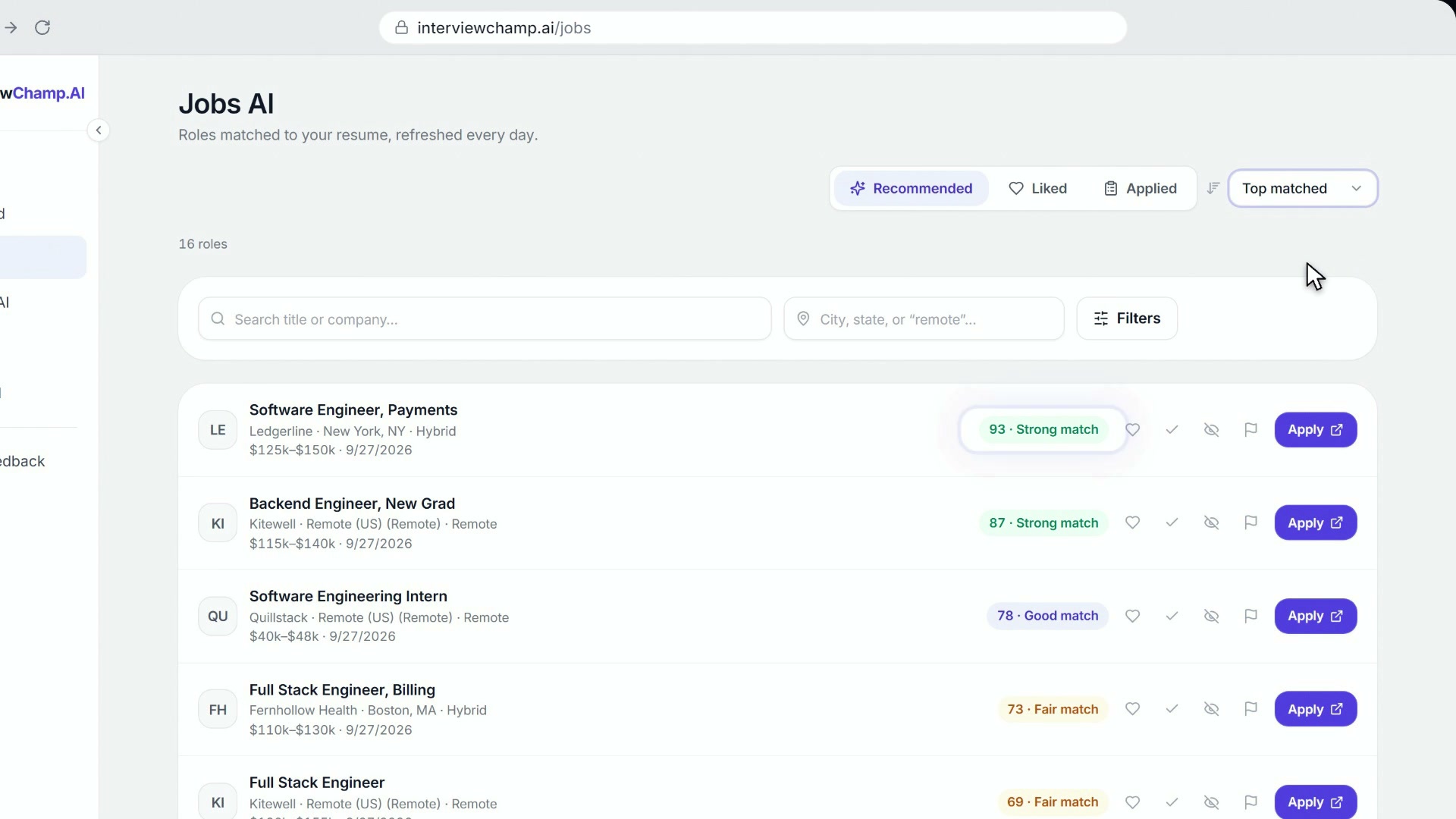
Jobs AI is InterviewChamp's jobs board. Open it from Jobs AI in the left sidebar, or go to /jobs. It lists open tech, remote and US jobs taken from employers' own career pages, refreshed every few minutes. Add your resume and every job you see gets a match score out of 100. From any job you can make a tailored copy of your resume, draft a cover letter, practice the interview, and apply on the employer's own page.
Anyone can browse the board and press Apply, with no account. A free account adds match scores, saved jobs, tailored resumes, cover letters and tracking.
The board: Recommended, Liked and Applied
The board has three tabs:
- Recommended: the open jobs, with your match score on each one.
- Liked: jobs you saved. Click the heart on a job to save it; click it again to remove it.
- Applied: your application tracker. Move each job from Applied to Interviewing, Offer, Rejected or Archived as things change.
Sort the list by Recommended, Top matched, Most recent or Company (A–Z), and use the filters, like Remote only, to narrow it. Jobs posted more than 90 days ago are left off the board.
On each job you can also click Not interested to hide it, or Report issue if it looks like a scam, is no longer available, or has wrong details.
How job matches work
Your match score is out of 100. It compares your resume with the job: your skills, your experience and your industry. For the jobs at the top of your list, our AI also checks whether the job is the right kind of work and level for you. That check can lower a score but never raises it. A job that was just added may show no score until the next refresh.
Each score gets a label:
| Score | Label |
|---|---|
| 85 to 100 | Strong match |
| 75 to 84 | Good match |
| 50 to 74 | Fair match |
| Under 50 | Stretch |
No score at all? Add a resume to your account first (Upload a resume).
Why you match: Explain fit
Open a job to see how your resume compares: which of its listed skills you have, which you're missing, and how your experience lines up. Click Explain fit and our AI gives you your strengths and gaps for that one job. Explain fit has a daily limit; if you reach it, try again the next day.
Tailor your resume to a job
Click Tailor resume to this job on a job. We rewrite a copy of your resume toward that role and save it to your resumes. Your original never changes. When it's done you see:
- the job's keywords that were woven into your resume
- the keywords that were not woven in, each with the reason (we only add what your experience backs up)
- the bullets left as they were because they were already strong
From there, Open in editor to change anything, find it under My Resumes, or click Use for interview to start an interview setup with this copy selected. More on editing in Resume AI rewrite.
Write a cover letter
Click Cover letter on a job to draft a letter matched to your resume and that job. Pick a tone (Professional, Enthusiastic, Concise or Warm), edit the text, then copy it or download it as .txt or PDF. Your letter is saved with the job, so you can come back to it.
Practice the interview
Each job has a Practice button that lets you rehearse the interview for that role with Mock AI.
Apply
Apply opens the job on the employer's own site in a new tab.
If your match score is under 75, Apply first asks whether you'd like to tailor your resume before you go: Tailor my resume first, or Apply anyway.
When you come back to the board, it asks Did you apply? Click Yes, track it and the job goes into your Applied tab.
Apply with Autofill (the Chrome extension)
Jobs on a hiring system our Chrome extension supports show Apply with Autofill instead of a plain Apply. With the Jobs AI Autofill extension installed, the employer's form opens in a new tab and the extension fills it from your autofill profile and resume. If you made a tailored copy of your resume for that job, the extension picks it for the upload. It never presses Submit: you check the form and send it yourself.
Your autofill profile (contact details, work history, education, work authorization, links) is at /jobs/autofill-profile. You fill it in once, and every application after that uses it.
Who gets what
- Every plan, free included: the board, filters and match scores.
- AI credits: tailored resumes, cover letters and autofill use AI credits. The free plan has 6 AI credits a day, shared with the resume builder's AI. Each credit comes back 24 hours after you use it. Pro and Pro+ have unlimited AI credits.
When you run out, the tool says "You've used today's AI credits" and when the next one comes back. Full details in Plan comparison.
Common questions
Q: Is Jobs AI free? A: Yes. Browsing, filters and match scores are free on every plan. Tailored resumes, cover letters and autofill use AI credits: 6 a day on the free plan, shared with the resume builder's AI, and unlimited on Pro and Pro+.
Q: Why don't I see match scores? A: Match scores need a resume in your account. Add one, then come back to the board. A job that was just added can show no score until the next refresh.
Q: Does tailoring change my original resume? A: No. It saves a new copy, named for the job, to your resumes. Your original stays exactly as it was.
Q: Will the tailored resume make things up? A: It only weaves in keywords your experience backs up. The ones it left out are listed with the reason, so you can decide whether to add them yourself.
Q: Do I need an account to apply? A: No. Anyone can browse the board and press Apply, which takes you to the job on the employer's own site. An account adds match scores, tailored resumes, cover letters and tracking.
Q: Where are the jobs I saved? A: In the Liked tab at the top of the board. Jobs you applied to are in the Applied tab.
Q: A job is gone, or the link doesn't work. A: The board re-reads each employer's own job page, so a job the company took down usually leaves the board at the next check. If one is still showing, use Report issue on it and pick "No longer available".
Still stuck?
Help & how-tos → Contact us with category "How do I…?" and the job you were looking at. The founder reads every reply.
Still stuck?
Sign in and message the founder directly from the Help & how-tos tab. Every reply comes from a real person, usually within a few hours.
Contact us