How to Add Numbers to Your Resume Bullets
Hiring managers skim. A number (a percent, a dollar amount or a count) is what makes them stop and read. Here is how to find your real numbers, and how InterviewChamp's resume reviewer points out the bullets that need one.
By Sam K., Founder, InterviewChamp.AI · Last updated
4 min readA recruiter may spend only a few seconds on your resume. A bullet with a number gets read. A bullet without one often gets skipped. This page shows you how to find real numbers for your own work, and how InterviewChamp helps you spot the bullets that need one.
What you get#
- Bullets that show results, so a quick skim still tells the story.
- Simple places to look for numbers, even if your job was not about sales.
- A clear list of which bullets are missing a number.
- An AI helper that writes a first draft of the bullet, which you then fix with your real number.
How to do it#
-
Start with the bullets that have no number. Read each bullet and ask: how many, how much, how often, or how fast? "Helped customers with questions" has no number. "Answered about 40 customer emails a day" does.
-
Look in the usual places. Your real numbers are closer than you think. Try these:
- Team size: how many people you worked with or led.
- Users or customers: how many people used what you made or served.
- Time saved: hours a week, or days a month.
- Money: budget, sales, savings, or amounts you handled.
- Volume: orders, tickets, reports or items you finished.
- Before and after: "cut wait time from 5 days to 2."
-
Let the reviewer show you the gaps. Open your resume in the editor. The reviewer flags the check when fewer than 30% of your work bullets show a number, and it marks each bullet that has none. The message reads: "Add a number (a %, a $ amount or a count) to at least N of your M bullets without a number. Any N of them work." When only one is needed, it ends "Any one works." The target is 30% of your work bullets, rounded up (1 of 3, 3 of 10, 6 of 20). N is how many more bullets still need a number.
-
Use Add a number with AI for a first draft. Press Add a number with AI on one bullet. It rewrites the bullet with a believable number for someone in that role, and keeps your wording where it can. Check the result, because it may still change a detail. The number is a guess. It is shown as "AI estimate — change to your real number". You accept or reject it. Nothing is saved without you.
Please read this part twice: always replace the estimate with your real number before you send your resume. Never send a number you cannot back up in an interview. If an interviewer asks "how did you get that 30%?", you should have a real answer.
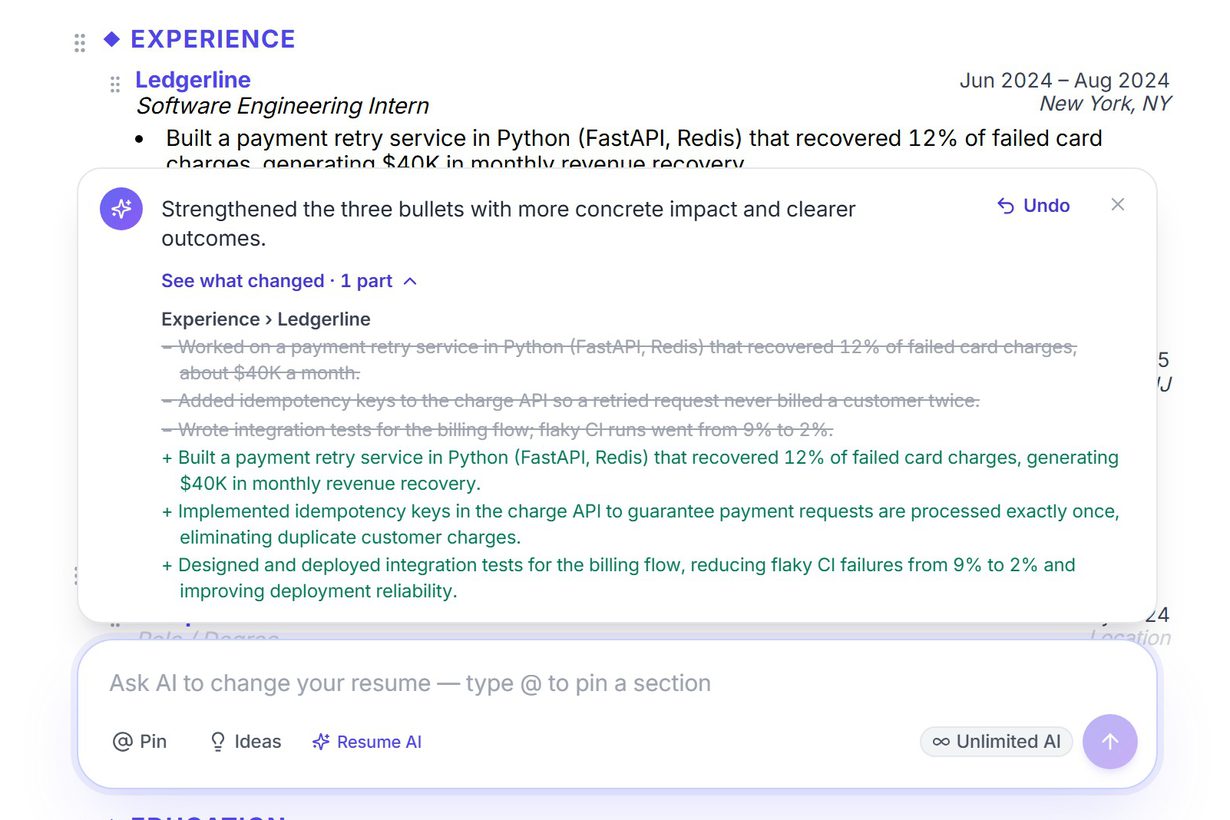
When you ask the AI chat to change your resume, each change shows up as a suggestion you accept or reject. This picture shows how those suggestions look in the editor.
Common problems and fixes#
- You see "Add a number (a %, a $ amount or a count) to at least N of your M bullets without a number." → You do not need a number on every bullet. Pick any N bullets from the marked ones and add a real number to each.
- You do not know the exact number. → Use a fair round figure you can explain, such as "about 20 clients." Ask a teammate, check old emails or reports, or look at your own notes.
- The AI estimate looks too big or does not match your job. → Reject it, or type over it with your real number. The estimate is only a starting point.
- The Add a number with AI button shows a lock. → That button is on Pro and Pro+. On Free you can still add numbers by hand, using the flagged bullets as your list.
- A bullet still reads flat after you add a number. → Start with what you did, then the result. "Cut report time from 3 hours to 1" is clearer than "Responsible for reports."
Which plans include it#
| Feature | Free | Pro | Pro+ |
|---|---|---|---|
| Add a number with AI | Locked | Yes | Yes |
Where not to use any interview tool#
Interview tools are for practice. Use one in a live interview only where the company allows it, and never in an online assessment, a proctored test, a recorded interview or a take-home task.
Related#
- Help: How the resume score is worked out and Editing your resume with the AI chat
- Product: AI resume builder
- Next step: AI mock interview that reads your resume
- Also read: Best AI interview assistants and Resume tactics for CS new grads
Originally published on InterviewChamp.AI
Related guides
AIApply Review: Auto Apply, Pricing and Refund Rules
AIApply finds jobs, tailors your documents and can submit applications for you using Auto-Apply credits; its pages don't show dollar prices, and its terms say Auto-Apply is non-refundable once applications are submitted. It has three modes, Review, Hybrid and Auto, and the mode you pick decides how many applications go out without you reading them. We make a different tool, InterviewChamp, so check every price on AIApply's own page.
Sam K. ·
Read more →Canva Resume Builder Review: Free Plan and Pro Pricing
Canva's resume builder is free: free templates, drag-and-drop editing and export as PDF, JPEG, PNG or Word. Canva Pro costs $18 a month or $144 a year for one person and adds premium templates and a much larger stock library, but most Canva subscriptions are not refundable. We make a different tool, InterviewChamp, so check every price on Canva's own page.
Sam K. ·
Read more →Careerflow Review: Free Plan, Premium Pricing and Refunds
Careerflow has a free plan and two paid tiers. Premium is $8.99 a week, $23.99 a month, $54.99 every 3 months or $172.99 a year, and Premium Plus costs more. We make InterviewChamp, so check each price on Careerflow's own page.
Sam K. ·
Read more →Frequently asked questions
- How many resume bullets need a number?
- InterviewChamp's reviewer flags your resume when fewer than 30% of your work bullets show a number. That is 1 of 3 bullets, 3 of 10, or 6 of 20. Any of your bullets can be the ones with numbers.
- What if my job had no numbers?
- Almost every job has some. Think of team size, how many people used your work, hours saved, money handled, how many items you finished, or how things looked before and after you changed them.
- Is it okay to guess a number?
- Only if you check it first. Use your real number, or a fair round figure you can explain in an interview. Never send a number you cannot back up.
- What does the Add a number with AI button do?
- It rewrites one bullet with a believable number for someone in that role. It keeps your wording where it can. The number is a guess and is marked as an AI estimate, so you change it to your real number. Check the whole bullet before you keep it.
- Which plans include Add a number with AI?
- Pro and Pro+. On the Free plan the button shows a lock.