How to Brief Your Helper Before an Online Interview
Once the company has said yes to outside help, send your helper a short written brief: the role, the interview format, your best stories, what they may do and the signals you agreed on. Then do a full practice run on the same setup at least a day before.
By Sam K., Founder, InterviewChamp.AI · Last updated
7 min readAbout the author: Sam K. is the founder of InterviewChamp.AI, which makes AI interview prep and a live interview helper, including Helper Mode. We sell a tool for this, so keep that in mind as you read.
TL;DR: Get the company's written yes first. Then give your helper a one-page brief, five or six short hint signals, a clear list of what they won't do, and one full practice run at least 24 hours before. A briefed helper sends fewer, better hints. That's the whole point.
How do you brief your helper before an online interview?#
You write it down. A helper brief is a one-page note that tells the person helping you what the job is, how the interview runs, which stories you plan to tell and what the company agreed they may do. Without one, your helper is guessing, and a guessing helper sends long, late hints that pull your eyes off the camera.
Most of this guide assumes the company already said yes to outside help. If you haven't asked yet, start with can someone help me during an online interview, which covers how to ask the recruiter.
Step one: make sure the company said yes#
Don't brief anyone until you have the yes in writing. Forward the recruiter's reply to your helper, because it sets the limits for everything below.
Read the yes closely. "You can have a support person" is not the same as "a friend can send you answers". If the company allowed notes, accessibility support or a reasonable accommodation, your helper's job is that and only that. If you have a disability, the EEOC explains that employers must provide a reasonable accommodation during the hiring process unless it causes undue hardship, so put what HR confirmed in the brief too.
And one rule never changes: no help of any kind during a test, a proctored assessment, a recorded video interview or a take-home. If the company allows help in a live conversation but a coding test starts partway through, your helper goes quiet until it ends.
What to put in the brief#
Keep it to one page. Your helper won't read five.
| What to send | Why it helps |
|---|---|
| The job post | They know which skills the interviewer is checking for |
| The interview type and length | A 30-minute recruiter call and a 60-minute panel need different help |
| Interviewer names and roles from the invite | They can tell which answers suit a manager and which suit an engineer |
| Your five or six best stories, with the real numbers | They can remind you of a number you forgot, not invent one |
| The questions you'll ask at the end | They can nudge you if you forget to ask |
| The company's written yes | Everyone knows the limits |
The stories matter most. Write each one as a single line: the situation, what you did and the result with its number. If you use the STAR method, that is situation, task, action and result, and one line per story is enough. Your helper should know your real stories better than any tool could, because they're true.
Agree on hint signals#
A hint signal is a short message you both agreed on before the call, so it means something at a glance. Long hints are a common way helper setups go wrong. You end up reading instead of talking.
Pick five or six, keep each to six words or fewer, and write them in the brief:
- "Slow down": you're rushing.
- "Add the number": you left out the result.
- "Wrap up": you've passed about 2 minutes on one answer.
- "Ask them back": a good moment to ask the interviewer a question.
- "Story 3": the project from line 3 of your brief fits this question.
- "You're doing great": because sometimes that is the most useful hint.
Notice what's missing: answers. Your helper reminds you of things you already know. You say them in your own words.
What your helper should not do#
Write these down too, so nobody has to decide on the day.
- Don't write answers. A sentence for you to read out is not a reminder anymore.
- Don't talk while the interviewer is speaking. Even typed hints can wait until the question is finished.
- Don't go beyond what the company agreed to. If the yes covered typed reminders, that's all.
- Don't help during any test. Coding tests, assessments and anything proctored are off limits, even mid-call.
- Don't talk over the call. If their voice comes out of your speakers, it can echo into the call and talk over the interviewer. Typed hints avoid that.
Set up Helper Mode together#
If you use Helper Mode, the setup takes a few minutes. It is part of the InterviewChamp desktop app for Windows and Mac, on the Pro+ plan, and it is in beta.
- Press Share with a helper in the desktop app and pick the screen to share. You get a link and a QR code.
- Send the link by WhatsApp or email, or let your helper scan the QR code. One link lets in one person, and making a new link shuts the old one.
- Your helper opens it in an up-to-date Chrome or Safari on their iPhone or laptop, types their name and taps Join. No app, no account.
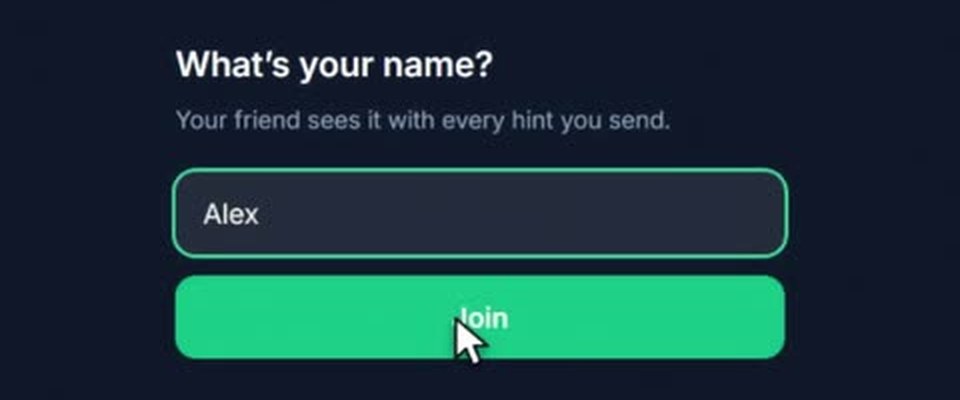
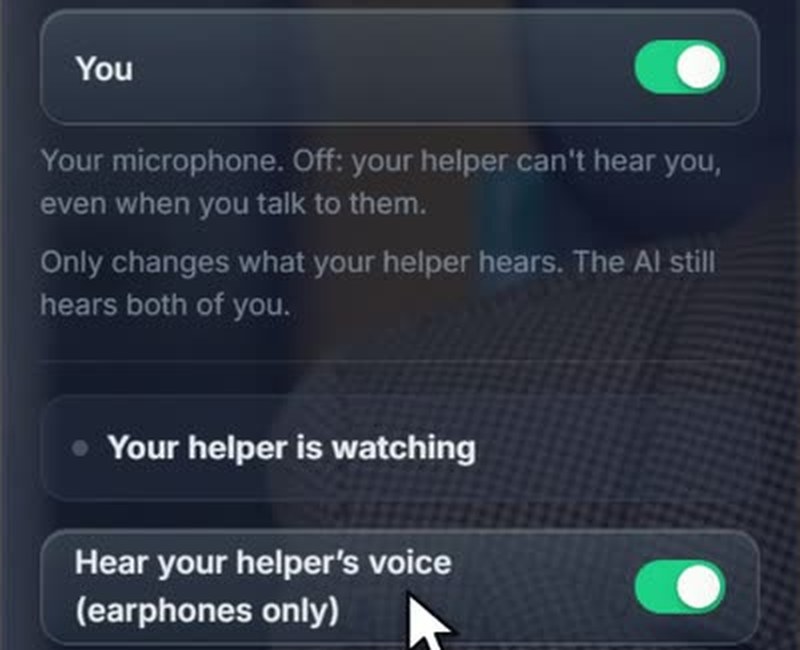
Then decide together what they hear. In the Helper Mode window you switch two sides on or off: The interviewer (everything your computer plays) and You (your microphone). Switching a side off only changes what your helper hears. Your helper's voice stays off unless you turn on Hear your helper's voice (earphones only).
Their typed hints show in your InterviewChamp window with their name. The full details are on the Helper Mode help page.
Do a practice run#
A practice run is a full mock interview with your helper on the exact setup you'll use on the day. Do it at least 24 hours before, so there's time to fix what breaks.
- Use the same computer, video app, earphones and internet. If the interview is on Zoom, Google Meet or Microsoft Teams, practice on that one.
- Run about 30 minutes with three or four real questions from the job post.
- Try every hint signal once, so you both know what each looks like on screen.
- Time each answer and aim to wrap up around 2 minutes.
- If you'll share your screen in the call, practice that too. Google Meet, for example, lets you present a tab, a single window or your entire screen, so decide which one ahead of time.
If your helper can't make a practice run, an AI mock interview is a decent stand-in for the timing and the questions. You still need one short test with your helper for the link and the sound.
On the day#
- Your helper joins your link 10 minutes before the call, not during it.
- Earphones in, and don't share your computer's sound in the meeting, so your helper's voice can't echo into the call.
- Your helper keeps the brief open on their side, so your screen stays on the interview.
- Hints are reminders. Glance, then answer in your own words.
Common mistakes#
- Briefing on the morning of the interview. Your helper won't remember a page they read 20 minutes ago. Send it two days before.
- Hints that are too long. If you have to read a hint for more than a second, it's too long. Cut it to six words.
- No limits in writing. If you only agreed out loud, you'll both improvise on the day.
- Skipping the practice run. Many problems are setup problems: the wrong screen shared, a side switched off, the link opened on the wrong device.
- Forgetting the test rule. If any part of the call becomes a test or an assessment, all help stops.
Related guides#
- Can someone help me during an online interview?: when outside help is allowed and how to ask the company.
- A person and an AI helping in one interview: how to split the work when you have both, and who has the final word.
- Zoom tech interview guide: screen share, sound and setup for a Zoom interview.
Key terms#
- Helper brief
- A one-page note telling your helper the role, the interview format, your stories and what the company agreed they may do.
- Hint signal
- A short message, six words or fewer, that you and your helper agreed on before the call.
- Practice run
- A full mock interview with your helper on the same setup you will use on the day.
- Helper Mode
- An InterviewChamp feature that lets one trusted person join your live call from a link and send you hints.
Originally published on InterviewChamp.AI
Related guides
AI Interview Assistant Feature Comparison: 12 Tools Side by Side
Most AI interview assistants now offer live answer suggestions and mock interviews. What actually differs is the size of the free plan, the plan length (weekly, monthly or lifetime), phone apps, coding help and whether a friend can help on the call. This page puts twelve tools in three feature tables, using only what each tool's own site says. We make InterviewChamp, so check anything that matters on each tool's page.
Sam K. ·
Read more →Best AI Interview Assistant for Coding Interviews: 9 Tools Compared
There is no single best AI interview assistant for coding interviews. To practice coding interviews out loud with feedback, pick by need: a mock with a real person, an AI mock, or a problem bank, and treat live coding copilots as tools for live rounds only where the company allows them. This page compares nine tools by name, with prices from each tool's own site. We make one of them, InterviewChamp, so check every price yourself.
Sam K. ·
Read more →Beyz AI Review: Pricing, Plans and Who It Is For
Beyz AI has three paid plans: $49.99 a month month-to-month, $32.99 a month billed quarterly, or $24.99 a month billed every 6 months. Only the two longer plans include its Coding Assistant, and you can start free without a card. This page covers what each plan includes, the up-front totals, and who it fits. We make a competing tool, InterviewChamp, so check every price on Beyz AI's own page.
Sam K. ·
Read more →Frequently asked questions
- How do I prepare a friend to help me in an online interview?
- First make sure the company allows outside help, in writing. Then send your friend a one-page brief with the job post, the interview format, your five or six best stories with their numbers, and exactly what the company agreed they may do. Agree on a few short hint signals and do a full practice run on the same computer, video app and earphones at least a day before.
- What should I send my helper before the interview?
- The job post, your resume, the interview type and length, the interviewers' names and roles if the invite lists them, your best stories with real numbers, the questions you plan to ask, and the company's written yes with what it covers. Keep it to one page so they actually read it.
- What should a helper type during an interview?
- Short reminders of six words or fewer, like 'Slow down', 'Add the number' or 'Ask them a question back'. Never full answers. A short hint takes a second to read, and the answer stays yours.
- What should my helper not do?
- They should not write answers for you, talk while the interviewer is speaking, or do anything the company did not agree to. If the call turns into a test, a coding assessment or anything proctored, they stop sending hints until it ends.
- How long before the interview should we do a practice run?
- At least 24 hours before, so there is time to fix what breaks. Run it on the same computer, video app, earphones and internet you will use, for about 30 minutes, with three or four real questions.
- Does my helper need to install anything to use Helper Mode?
- No. In InterviewChamp's Helper Mode your helper opens your link in an up-to-date Chrome or Safari on their iPhone or laptop, types their name and taps Join. No app and no account. You need the InterviewChamp desktop app for Windows or Mac and the Pro+ plan. Helper Mode is in beta.
- Can the interviewer hear my helper?
- Only if your helper's voice comes out of your speakers or you share your computer's sound in the call. Wear earphones, keep your computer's sound out of the meeting, and keep your helper on typed hints unless you agreed otherwise with the company.
- Do I still need a helper brief if the company only allowed notes or accessibility support?
- Yes, and it matters more. Write down exactly what the company agreed to, share it with your helper, and keep them inside it. If you have a disability and asked for a reasonable accommodation, include what HR confirmed.